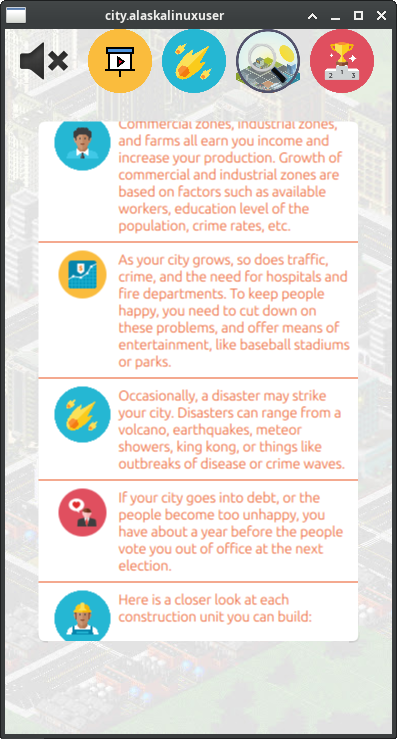
With only the audio left to work on, I decided it was time to start beta testing the game. I put it on the UBports forum[2] so others with Ubuntu Touch phones could try it out. Unfortunately, I didn't get much traction there. I also posted it on the UT QA telegram channel, where you can post an app to have it QA'd before release, and I did get one person who tried it out there. I don't want to sound discouraged here, but it was rather sad that I didn't get many takers on trying out what I thought would be a great game. There is such a huge lack of games on UT that I figured people would be very interested in it.
In any event, one person did try it out, and they brought up three points for me to consider:
- No tutorial (maybe i am too dumb, but how can i earn money?)
- When you enter menu, you cant go back to game
- In menu load game button doesnt seem to work
Creating a tutorial
It's kind of funny, but when we work on something, we become so focused on it, that we don't consider what other people may know or not know, or think or not think about your project. So it was really helpful to get these insights from him. It never occured to me that someone could have grown up without playing "SimCity" or one of the clone games, and not know what to do to play this game. Of course, even for those who played SimCity growing up, they may be unfamiliar with the quirks of my game. This lead to creating a tutorial. I'm not sure that it is the best tutorial, but I feel it will at least get them pointed in the right direction.
Return to game button
As for the "going back to game" comment, I realized that there was a little bit of a workaround that I had been using for so long it became the norm. You see, if you are playing the game and then click the menu button, the menu screen appears. Typically, I save the game, do whatever, and then hit load game to return to the game. This of course is not propper for several reasons.
First, you shouldn't have to save so you can load to go back to the game. In fact, you may not want to. You may have a saved game you are saving for later, and just be playing a fun little game in the mean time. You should simply be able to return to the game in progress, without saving it.
Second, saving and loading the game actually changes the game a little bit. For instance, some variables are set, saved, and loaded, while others (which I deemed inconsequential) are not. While I feel that there is no loss of gameplay value, some of the smaller variables, especially some of the randomized ones, can change, causing a slightly different outcome. While I don't care if the user cheats, personally, I can see how someone could save the game, look at the saved game file, and then know how the next randomized thing was going to transpire, thus preventing or preparing for it. By not saving some of those randomized things, you save the wasted code and space of saving and restoring them, and just simply make a new randomized number for it's value when the game is launched. A silly, but interesting example is where the forest trees are. Forrest trees are randomly planted every time the game is loaded, so a tile may have "tree-A" on it when you went to the menu and saved the game, but when you load the game, it may have "tree-B" on it instead. It has no affect on the game itself, other than perhaps some sort of cosmetics to the user.
Third, saving and loading the game takes more time than just returning to the game. Even though it only takes a second to save, and a second to load, as well as a few seconds of pushing okay on the save popup, that's still about 5 seconds longer than just pressing "return to game" and instantly being back on the field. Certainly a good suggestion and I'm glad it was brought up.
Loading saved game didn't work
This was an interesting one, because the person giving me feedback said that saving and loading the game sometimes didn't work. I tried it several times without issue, so I was a bit perplexed as to what the problem could be. Fortunately, the beta tester was willing to provide a log, and it pointed me in the correct direction. The problem wasn't actually with saving and loading the game, but rather that it saved a bad block of data and couldn't load it. The reason it saved a bad block of data was because if you clicked on a building to construct, but didn't have enough money to actually build it, then when you clicked on the map it would write a blank block to that square of the board.
The reason this happened was because the check for cost vs bank account took place too late in the process. In the end, I simply had to move the cost vs bank account statement to an earlier point in the code, before it destroyed the current block. You can take a look at the code[3] on my gitlab if you'd like, but it was pretty simple.
Bug squashing: uppended roads
One bug that I found during my testing, which needed some work, was uppended roads. For some reason, roads get uppended when hit with a disaster. What I mean by that, is when a disaster strikes a road tile, instead of replacing the road tile with the disaster tile, you end up with a road tile sticking straight up out of the ground. In some ways, that may be commical and desireable, but doens't help much with playing the game and makes the visuals very odd.
When you click on such a tile, trying to get more information from it, it will report back the disaster tile that it was supposed to be, e.g, rubble for an earthquake, blaze for a lava pool, etc. So, I had to figure out when in the code, and why in the code, this happens.
First, I added some code to the BdBlock.qml to see what was going on under the hood. Was the road refusing the replacement tile name, or what?
                abstractBlock.holding = holding;

                var jsonString = JSON.stringify(abstractBlock.holding.objData);
                console.log(jsonString);

                gameHolder.boardArray[xPos][yPos] = abstractBlock;

                abstractBlock = Logic.gameHolder.boardArray[xPos][yPos];
                jsonString = JSON.stringify(abstractBlock.holding.objData);
                console.log(jsonString);

                gameHolder.updateNeighbours(xPos, yPos);

                abstractBlock = Logic.gameHolder.boardArray[xPos][yPos];
                jsonString = JSON.stringify(abstractBlock.holding.objData);
                console.log(jsonString);
All of that fancy looking code simply logs what the gameholder boardarray thinks the tile should be three times in a row. The first time is to tell me what I am updating it with, the second time is right after that abstract block is written to the board array, and the third time is after a function call to "updateNeighbours".
qml: {"boardImage":"../assets/lands/empty/rubble_tile.png","destroyable":true,"imageRotation":-45,"income":0,"level":-1,"location":"../assets/lands/empty/Rubble.qml","mapColor":"#d00","name":"Rubble","noise":"../assets/lands/empty/bird.wav","placed":true,"pollution":0,"price":0,"replacable":true,"size":1,"sound":"../assets/lands/empty/bird.wav","viabilitySource":false,"volume":0.5,"zone":"b","initial":false,"production":0,"xPos":0,"yPos":4}
qml: {"boardImage":"../assets/lands/empty/rubble_tile.png","destroyable":true,"imageRotation":-45,"income":0,"level":-1,"location":"../assets/lands/empty/Rubble.qml","mapColor":"#d00","name":"Rubble","noise":"../assets/lands/empty/bird.wav","placed":true,"pollution":0,"price":0,"replacable":true,"size":1,"sound":"../assets/lands/empty/bird.wav","viabilitySource":false,"volume":0.5,"zone":"b","initial":false,"production":0,"xPos":0,"yPos":4}
qml: {"boardImage":"../assets/lands/road/end_bottom.png","destroyable":true,"imageRotation":-45,"income":0,"level":-1,"location":"../assets/lands/empty/Rubble.qml","mapColor":"#d00","name":"Rubble","noise":"../assets/lands/empty/bird.wav","placed":true,"pollution":0,"price":0,"replacable":true,"size":1,"sound":"../assets/lands/empty/bird.wav","viabilitySource":false,"volume":0.5,"zone":"b","initial":false,"production":0,"xPos":0,"yPos":4}
A careful eye will notice that the rubble tile is written correctly to the abstractBlock, and then written correctly to the boardArray. For all intents and purposes, the board array believes it is a rubble tile. However, after the call to gameHolder.updateNeighbours(xPos, yPos); to update it's neighbors of the change, ther is now a wrong "boardImage". It has all the characteristics of rubble, but with a "end_bottom" road image in it's place. Which reveals that the road is replaced with rubble until the function is run. At least now I know where to look for the issue.
The entire updateNeighbours function looks like this:
Game.prototype.updateNeighbours = function(xPos, yPos) {
    var neighbours = this.getNeighbours(xPos, yPos);
    for(var prop in neighbours) {
        if(neighbours[prop] && neighbours[prop].holding.update) {
            neighbours[prop].holding.update(gameHolder, {
                x: neighbours[prop].base.xPos,
                y: neighbours[prop].base.yPos
            });
            this.boardArray[neighbours[prop].base.xPos][neighbours[prop].base.yPos].base.update();
        }
    }
}
So not a lot to work with here. However some other functions are called during this update. I decided to start by checking what the output of the getNeighbours was for the current tile, like so:
Game.prototype.updateNeighbours = function(xPos, yPos) {
    console.log("update neighbours");
    var neighbours = this.getNeighbours(xPos, yPos);
    var jsonString = JSON.stringify(neighbours.current.holding.objData);
    console.log(jsonString);
    for(var prop in neighbours) {.....
Which revealed that at this point, it still believed the tile was rubble, and not a road. So the issue or problem must show up later in the code.
Thus, I moved a little farther down the line, like this:
for(var prop in neighbours) {
        if(neighbours[prop] && neighbours[prop].holding.update) {
            neighbours[prop].holding.update(gameHolder, {
                x: neighbours[prop].base.xPos,
                y: neighbours[prop].base.yPos
            });
            this.boardArray[neighbours[prop].base.xPos][neighbours[prop].base.yPos].base.update();
            jsonString = JSON.stringify(neighbours[prop].holding.objData);
            console.log(jsonString);
        }
Which yeilded these results:
qml: It's an earthquake! 35
qml: update neighbours
qml: {"boardImage":"../assets/lands/empty/rubble_tile.png","destroyable":true,"imageRotation":-45,"income":0,"level":-1,"location":"../assets/lands/empty/Rubble.qml","mapColor":"#d00","name":"Rubble","noise":"../assets/lands/empty/bird.wav","placed":true,"pollution":0,"price":0,"replacable":true,"size":1,"sound":"../assets/lands/empty/bird.wav","viabilitySource":false,"volume":0.5,"zone":"b","initial":false,"production":0,"xPos":0,"yPos":2}
qml: {"boardImage":"../assets/lands/road/end_bottom.png","destroyable":true,"imageRotation":-45,"income":0,"level":-1,"location":"../assets/lands/empty/Rubble.qml","mapColor":"#d00","name":"Rubble","noise":"../assets/lands/empty/bird.wav","placed":true,"pollution":0,"price":0,"replacable":true,"size":1,"sound":"../assets/lands/empty/bird.wav","viabilitySource":false,"volume":0.5,"zone":"b","initial":false,"production":0,"xPos":0,"yPos":2}.....
To explain, the first QML JSON data shows what I logged earlier, this is the data that is there before the base.update takes place, which is the correct data with the rubble_tile. But for some reason, when the base.update happens, we get this second QML JSON data, which shows the wrong road tile. I narrowed it down further, and found that this bit of code is where the change takes place:
            // So the problem happens between here:
            neighbours[prop].holding.update(gameHolder, {
                x: neighbours[prop].base.xPos,
                y: neighbours[prop].base.yPos
            });
            // And here.
Which actually lead me to consider, what does updateNeighbours actually do? After some searching and consideration, I think what it does is re-choose which road tile is displayed for any given road square because it may need to reroute a road that has changed. E.g., when you build a road tile, it no longer is a straight road, but is now a three way intersection, so it updates the neighboring tile's road image to match the newly formed outcome. That's really important, because if you build a bus station on a road tile and that changes the next road tile from a three way intersection to a straight road, then it should update the image to reflect that.
But as I thought on this, I realized that I actually didn't need to run this check at all! You see, when a meteor hits your road, you didn't purposely change it, so it shouldn't fix itself or route a new direction, it should look like it dead ends at rubble, because that is what happened. While I should have been able to figure out and fix this, the truth is, I didn't want it to happen at all! All I had to do to solve this issue was to comment out one line:
//gameHolder.updateNeighbours(xPos, yPos);
That way, the check is never run, which then wont fail, and all is not only well, but better, because now the roads look like they dead end at rubble or lava, or whatever disaster struck it. I guess it really was much ado about nothing, in the end!
Hopefully, more beta testers will chime in, but if not, my next goal is to tackle audio. We'll see how that goes! And remember, you can always check it out on my gitlab[1] if you are interested.
Linux - keep it simple.
[1] https://gitlab.com/alaskalinuxuser/citysim-ubuntutouch [2] https://forums.ubports.com/topic/12270/call-for-testing-beta-citysim-a-city-simulation-game [3] https://gitlab.com/alaskalinuxuser/citysim-ubuntutouch/-/commit/76c4c9060aea25e60a8b36450e7d9c10d5ddf0a9